 MidiAI Studio
Guide �� MusicXML & score interchange
Converting MIDI Into MusicXML Notation
Converting MIDI to MusicXML is the harder cousin of converting MusicXML to MIDI, and understanding why reveals something fundamental about both formats. MIDI records a performance without the written scaffolding ? no key signature, no note spelling, no beaming ? so producing notation from it means reconstructing meaning the file never held.
This is the same challenge as printing sheet music from MIDI, but aimed at an interchange file rather than a page. The goal is a MusicXML that opens cleanly in any notation program as a readable score, which requires the conversion to make many written-language decisions the performance data left open.
This guide walks through those decisions in order, so that a MIDI file ? whether recorded or produced by MidiAI Studio ? becomes MusicXML you can hand to a notation program and get a legible score rather than a mess of un-spelled, un-beamed notes.
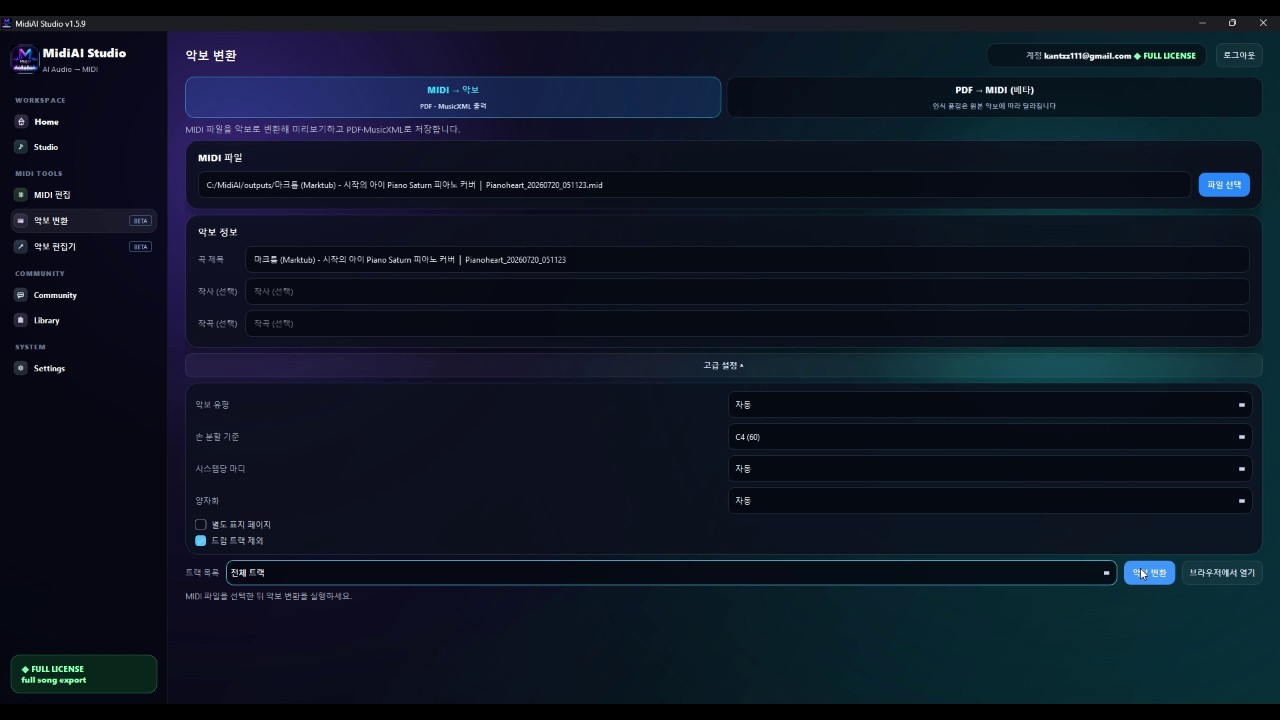
Why MIDI lacks the information notation needs
Converting MIDI to MusicXML means transforming a timed performance stream into structured written notation, supplying the key, meter, note spelling, voicing, and layout that MIDI does not store. It is the act of turning what was played into what would be written.
The defining difficulty is that MIDI is under-specified for notation: a single MIDI note carries a pitch number and timing but says nothing about whether it is a sharp or a flat, which voice it belongs to, or how it should be beamed. All of that must be inferred to produce readable MusicXML.
Quantizing performance timing into written rhythm
Quantization comes first, because a performance's loose timing must be rounded to notatable rhythms before anything can be written on a staff. The engine snaps events to a rhythmic grid, trading a little timing realism for the clean durations that notation requires, and choosing the right grid is as consequential here as in any MIDI-to-page conversion.
Pitch spelling and key inference follow, since MIDI note numbers are enharmonically ambiguous. MidiAI Studio estimates the key from the pitch content and spells each note as the sharp or flat a reader would expect, so an F-sharp in a D-major passage is written as F-sharp rather than G-flat, and the accidentals look natural on the page.
Then structure is reconstructed: the flat stream is split into staves and voices, simultaneous notes are grouped into chords, and beaming, ties, and rests are added to make the rhythm legible. Only when all of this written meaning is layered on does the MusicXML export produce a score a notation program can display cleanly.
Inferring key and spelling notes correctly
Notating a recorded two-hand piano take for a student
Imagine you recorded a two-hand piano piece to MIDI in D major at a loose 90 BPM, and you want clean notation in MusicXML to give a student. Played literally, the MIDI is expressive but un-notatable, full of timing nuance no reader could parse.
MidiAI Studio quantizes the timing to a sixteenth-note grid, infers D major and spells the raised leading tone as C-sharp, and splits the take across treble and bass staves. It groups the left-hand chords, beams the right-hand runs, and adds the ties the performance implied across barlines.
The exported MusicXML opens in the student's notation program as a readable grand-staff score. A short polish pass ? confirming one voice split and adjusting a beam grouping ? finishes it, turning a personal recording into teaching material.

Reconstructing voices and staves from a flat stream
- Quantize to a grid the music fits. Round the performance timing to the finest rhythmic value the piece actually uses. A well-chosen grid tidies the rhythm for notation without erasing genuine subdivisions.
- Set or confirm the key for spelling. Establish the key so notes are spelled as the sharps or flats a reader expects. Correct key inference is what keeps the accidentals on the page from looking arbitrary.
- Split into staves and voices. Separate the flat MIDI stream across staves and into independent voices. Clean voicing yields correct stems and rests instead of an unreadable pile of notes.
- Add beaming, ties, and rests. Let the conversion group beams, connect ties across barlines, and place rests sensibly. These are what make correct rhythm actually legible on the staff.
- Export and polish in a notation program. Open the MusicXML in your editor and refine voice splits, beams, and spacing. MIDI-to-notation always needs a short human pass to read its best.
Adding beaming, ties, and rests that read well
- Clean stray MIDI timing before quantizing so the grid has a clear target.
- Provide the key explicitly when you know it, rather than relying on inference.
- Choose the coarsest grid that still captures the real rhythms for a clean page.
- Verify voice separation before trusting the beaming and rests.
- Treat the exported MusicXML as a draft that expects a short polish pass.
Guessing articulations MIDI only implies
- Skipping quantization: Un-rounded performance timing produces un-notatable rhythms and a cluttered, unreadable page.
- Letting key inference guess blindly: Without a confirmed key, spelling defaults create awkward accidentals throughout.
- Leaving the stream un-voiced: A single undivided stream yields nonsensical stems and rests in any dense passage.
- Trusting beaming before voicing: Beaming applied over merged voices groups notes that do not belong together.
- Expecting a print-ready export: MIDI lacks notation detail, so skipping the polish pass leaves a rough-looking score.
Exporting MusicXML your notation program will love
This conversion is the clearest demonstration of what MIDI deliberately leaves out. Working from a performance to a page, you feel every gap: the ambiguity of every enharmonic pitch, the absence of a key, the missing voice boundaries. Rather than a flaw, this is MIDI being honest about its job ? it stores a performance, and notation is a different language it never claimed to speak.
Quantization sits at the heart of the difficulty and deserves respect as an editorial act. Deciding that a loosely-played passage is really straight sixteenths, or a triplet feel, is a musical judgment that shapes the entire notated result. MidiAI Studio gives you grid control precisely because the performance alone cannot settle the question; only musical intent can.
The manual polish MIDI-to-notation always needs
Spelling is a quietly deep problem because it depends on context a bare pitch number cannot supply. The same MIDI note is a G-sharp in one harmonic context and an A-flat in another, and getting it right means reasoning about the key and the line. When the conversion spells a chromatic passage the way a musician would, that is real musical inference at work, not mere lookup.
The honest expectation to carry is that MIDI-to-MusicXML produces a first engraving, not a final one. The reconstruction is impressive but inherently incomplete, and a short human polish ? confirming voices, adjusting beams, refining spacing ? is part of the process rather than a sign of failure. Embracing that final pass is what turns a good conversion into a clean, teachable score.
FAQ
Straight answers for musicians researching MIDI to MusicXML notation. Expand any question?answers stay on this page so you do not bounce away mid-read.
Why is converting MIDI to MusicXML harder than the other direction?
Because MIDI lacks the written information notation needs ? key, spelling, beaming, and voicing ? so all of it must be inferred. Going from MusicXML to MIDI merely drops detail, while going to MusicXML must reconstruct it.
How does the converter decide how to spell notes from MIDI?
It infers the key from the pitch content and spells each note as the sharp or flat a reader would expect in that key. Supplying the key yourself makes this even more reliable.
Can a flat MIDI stream become a proper multi-voice score?
Yes, by splitting it across staves and separating independent lines into voices. Clean voicing is what allows correct stems, rests, and beaming in the resulting notation.
Do I need to quantize MIDI before exporting MusicXML?
Effectively yes ? performance timing must be rounded to notatable rhythms before it can be written on a staff. Choosing a grid that matches the music's subdivisions keeps the page readable.
Will MIDI-to-MusicXML give me a print-ready score immediately?
Usually not quite. Because MIDI omits notation detail, the export is a strong draft that benefits from a short polish pass ? confirming voice splits, beams, and spacing ? before it reads its best.